Git Flow
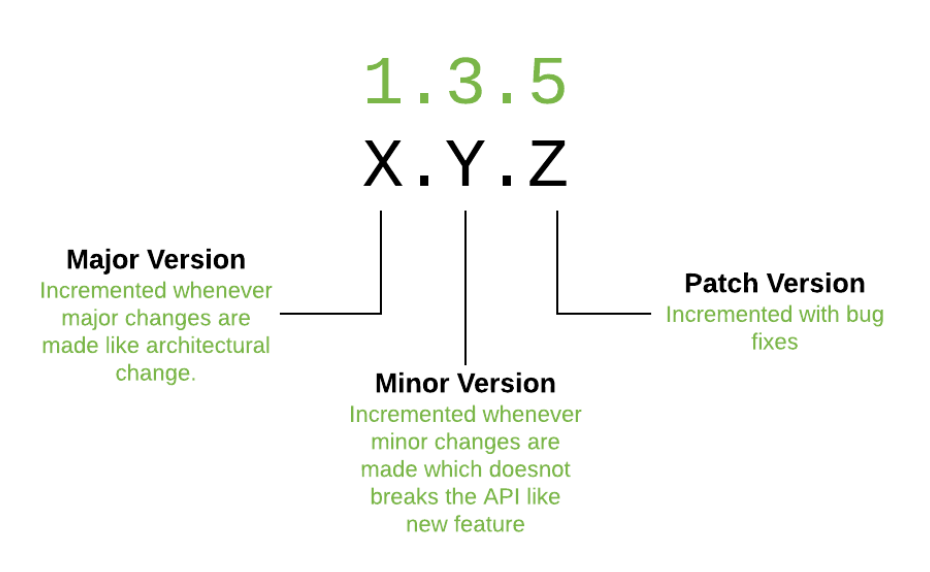
Understand the SemVer Components in Simple Way
-
MAJOR Version: Incremented for incompatible changes.
-
MINOR Version: Incremented for backward-compatible new features.
-
PATCH Version: Incremented for backward-compatible bug fixes.
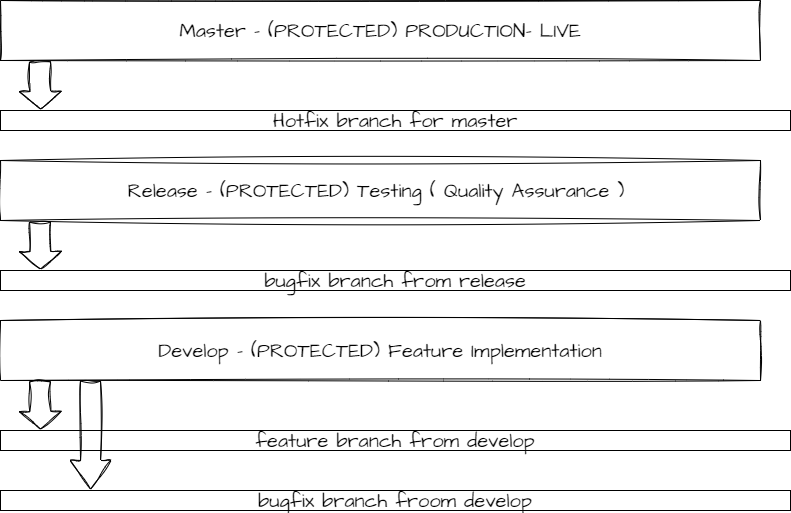
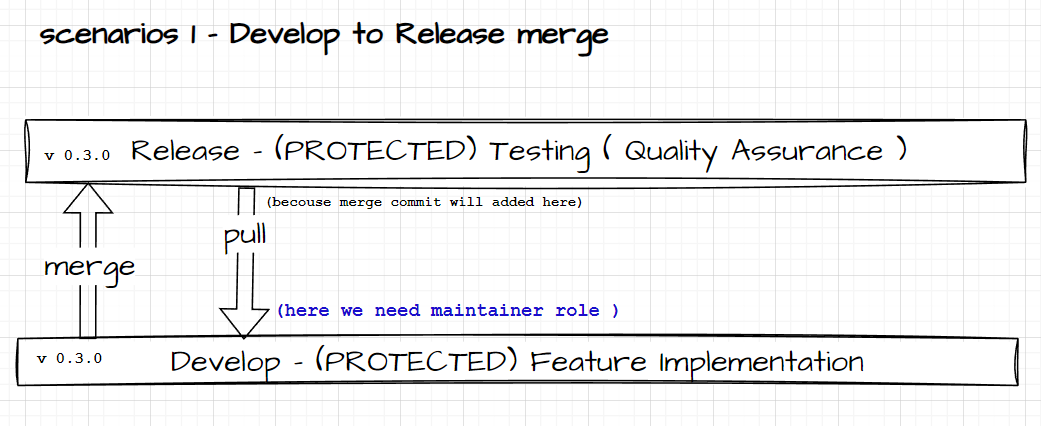
Merge Process
-
Test the
developbranch locally before merging it intorelease. -
Create a merge request to merge into the
developbranch. -
To resolve conflicts, a maintainer role is required.
-
Locally checkout (switch to) the
developbranch and pull fromrelease. -
Resolve any conflicts (ensuring that the code remains functional and bug-free).
-
Test locally to ensure all functionality works, then push changes to the remote
developbranch. -
Merge changes into the
releasebranch for Testing. -
Once the pipeline completes successfully, checkout (switch to) the
developbranch and pull fromreleaseto incorporate the merge commit. This prevents conflicts in future merges fromrelease.
scenario 2 - Bugfix to Release and Develop
-
Purpose: Address specific bugs or issues.
-
Naming: it should be like
bugfix/#<issue_no>/<developer_name>. -
Versioning: Bug fixes typically lead to a
PATCHincrement.
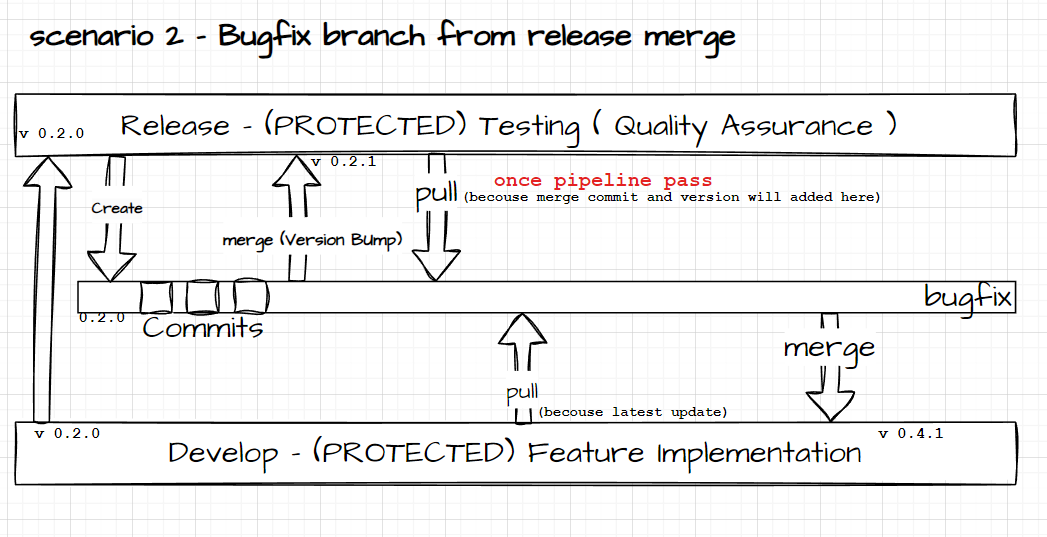
Steps
-
While testing, if any bugs are found, create a
bugfixbranch from thereleasebranch. -
Fix the bug and test it thoroughly.
-
Create a merge request to merge the
bugfixbranch into thereleasebranch (do not delete thebugfixbranch). -
Resolve any conflicts locally, ensuring that the code remains functional and bug-free.
-
Merge the
bugfixbranch into thereleasebranch. -
Once the pipeline completes successfully, checkout (switch to) the
bugfixbranch and pull fromreleaseto incorporate the version bump commit. This prevents conflicts in future merges. -
Checkout the
bugfixbranch and pull fromdevelopto update thebugfixbranch with the latest changes fromdevelop. -
If conflicts arise while pulling from
develop, resolve them and then merge thebugfixbranch intodevelop, ensuring that it works correctly.
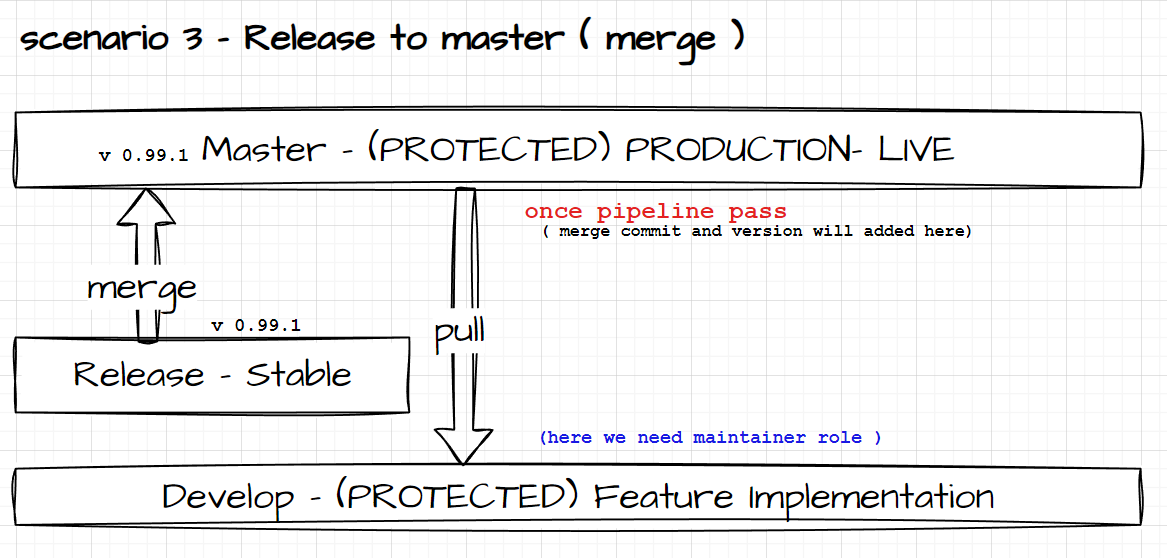
scenario 3 - Release to Master and develop
-
Purpose: Contains the latest stable release. -
Versioning: Updates when a new version is released. ( now we are doing manually (Version Bump) )
Steps
-
Once the
releasebranch is working fine, obtain permission from higher authority to merge into production/live. -
Verify that old version code does not negatively impact live users by thoroughly testing all functionalities.
-
Create a merge request to merge
releaseintomaster. -
A maintainer role is needed to resolve conflicts.
-
Checkout to the
releasebranch and pull frommaster. Resolve any conflicts locally, ensuring that both new and existing features work correctly. -
Merge the
releasebranch intomasteronce the pipeline is successful. Pull the latest code into thedevelopbranch, test it, and push to the remote repository.
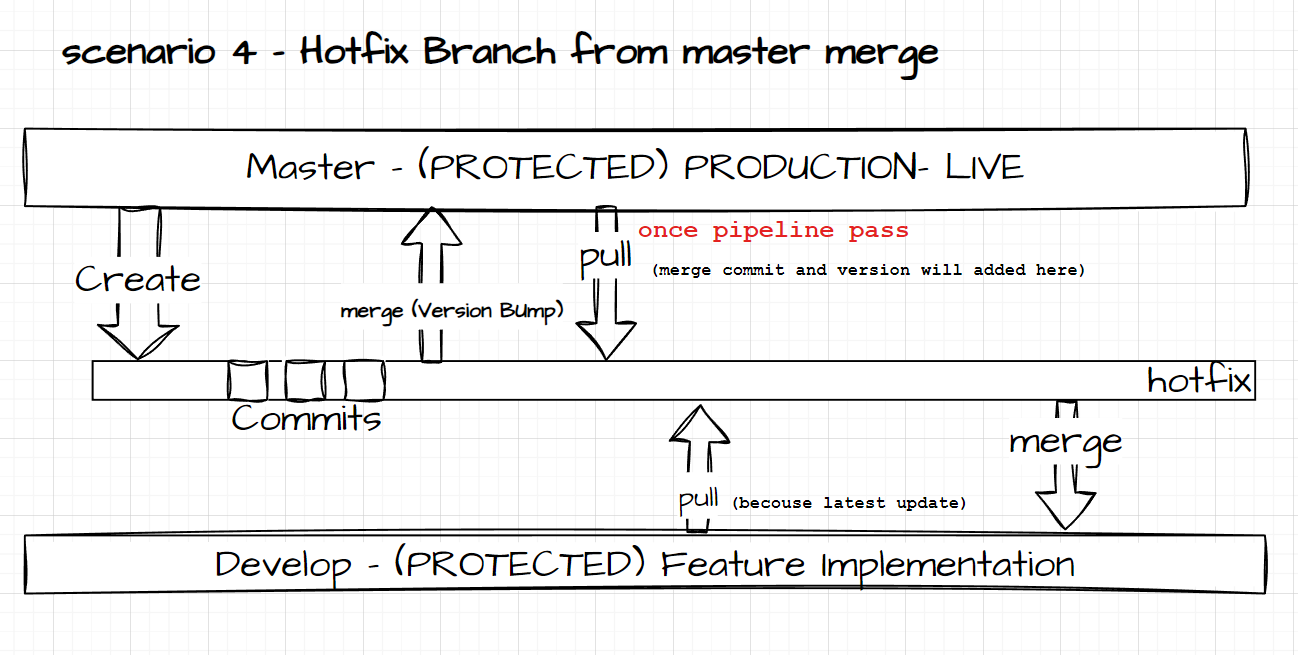
scenario 4 - Hotfix to master and Develop
-
Purpose: Quickly address urgent issues that need to be resolved in the current release. -
Naming: Namedhotfix/#<issue_no>/<developer_name>. -
Versioning: These typically increment thePATCHversion. Merged into both main and develop or release branches as necessary.
Steps
-
If a bug arises from
master, immediately create ahotfixbranch frommaster. -
Fix the issue and test it locally, ensuring that the fix does not affect existing code.
-
Create a merge request to merge the
hotfixbranch intomaster. Resolve any conflicts and test it again. -
Merge the
hotfixbranch intomaster(do not delete thehotfixbranch). Once the pipeline is successful, pull the latest code frommasteranddevelop, resolving any conflicts. -
Merge the
hotfixbranch intodevelop. After the merge, delete thehotfixbranch.
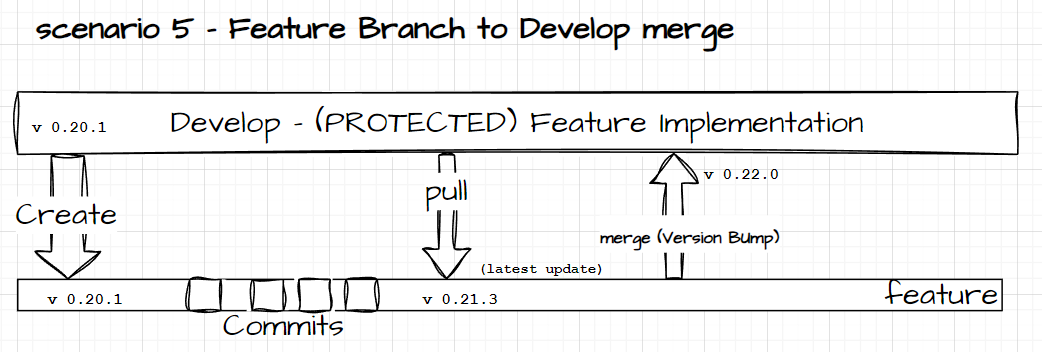
scenario 5 - Feature to Develop Branch
-
Purpose: Develop new features or improvements.
-
Naming: Typically named something like
feature/#<issue_no>/<developer_name>. -
Versioning: Bug fixes typically lead to a
MINORincrement.
Steps
-
Before starting feature implementation, discuss with all relevant teams (Android, Web, Backend) to understand how the feature may impact their work.
-
Once the feature is complete, test it locally thoroughly. Compare the implementation across Android and Web to ensure consistency and that it works on both ends.
-
Create a merge request to merge the feature into the
developbranch. -
Update the code by pulling the latest changes from
develop, resolve any conflicts locally, and retest to ensure that everything works correctly. -
Merge the feature into the
developbranch. -
After merging, delete the
featurebranch.
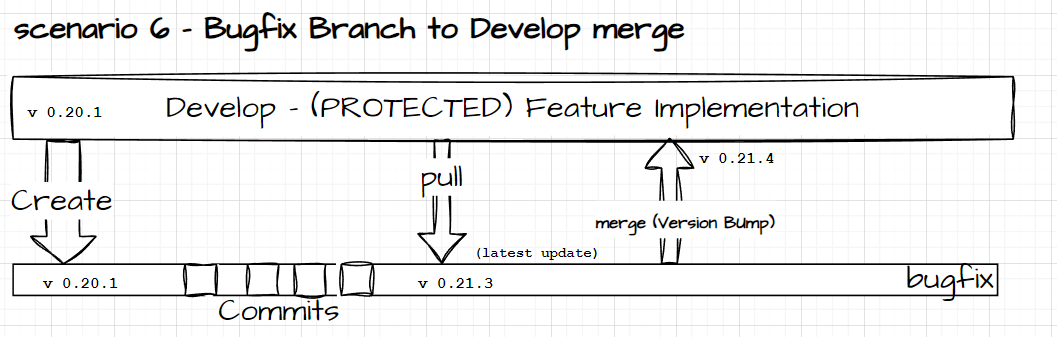
scenario 6 - Bugfix to Develop Branch
-
Purpose: Address specific bugs or issues.
-
Naming: it should be like
bugfix/#<issue_no>/<developer_name>. -
Versioning: Bug fixes typically lead to a
PATCHincrement.
Steps
-
If a bug arises during new feature implementation due to an old feature, create a
bugfixbranch fromdevelop. -
Discuss the bug with all relevant teams (Android, Web, Backend) to ensure the fix will not impact other functionalities.
-
Fix the issue in the
bugfixbranch, test it thoroughly, and cross-check with other teams. -
Once the code is working fine, pull the latest updates from
develop. -
Resolve any conflicts, test the code again, and then merge the
bugfixbranch intodevelop. -
After merging, delete the
bugfixbranch.