Deploying Microservices on Amazon EKS
Step 1: Prerequisites
Before you begin deploying microservices on Amazon Elastic Kubernetes Service (EKS), ensure you have the following prerequisites in place:
-
Necessary permissions to create EKS clusters.
-
The AWS Command Line Interface (CLI) installed and configured.
-
kubectl(EKS command-line tool) installed and configured.
Step 2: Create YAML Files for Microservices
Create Kubernetes YAML files for each of the microservices. These YAML files should define the following:
-
Deployment: Defines the desired state for your microservice, including the container image, replicas, and resource limits.
-
Service: Exposes your microservice within the cluster or externally.
-
HPA(HorizontalPodAutoscaler): A HPA automatically updates a workload resource (such as a Deployment or StatefulSet), with the aim of automatically scaling the workload to match demand.
-
Horizontal scaling means that the response to increased load is to deploy more Pods. This is different from vertical scaling, which for Kubernetes would mean assigning more resources (for example: memory or CPU) to the Pods that are already running for the workload.
-
If the load decreases, and the number of Pods is above the configured minimum, the HorizontalPodAutoscaler instructs the workload resource (the Deployment, StatefulSet, or other similar resource) to scale back down.
-
| To achive HorizontalPodAutoscaler We need to configure metric server |
-
Liveness and Readiness Probes:
-
Liveness Probes: The kubelet uses liveness probes to know when to restart a container. For example, liveness probes could catch a deadlock, where an application is running, but unable to make progress. Restarting a container in such a state can help to make the application more available despite bugs. -
Readiness Probes:The kubelet uses readiness probes to know when a container is ready to start accepting traffic. A Pod is considered ready when all of its containers are ready. One use of this signal is to control which Pods are used as backends for Services. When a Pod is not ready, it is removed from Service load balancers.
-
Here’s an example of a simple YAML file for a microservice Deployment:
apiVersion: apps/v1
kind: Deployment
metadata:
  name: master
  namespace: services
  labels:
    app: master
spec:
  selector:
    matchLabels:
      app: master
  replicas: 1
  strategy:
    rollingUpdate:
      maxSurge: 25%
      maxUnavailable: 25%
    type: RollingUpdate
  template:
    metadata:
      labels:
        app: master
    spec:
      containers:
      - name: master
        image: 9XXXXXXXXX1.dkr.ecr.ap-south-1.amazonaws.com/kbt-md-repo-ecr:ms_md_master-V0.0.XXX
        imagePullPolicy: Always
        env:
          - name: KB_CERTS
            value: lwpNbyjCxxxxxxxxxxxxxxxxxxxxxDxR8
          - name: KB_CLIENT_ID
            value: mercotrace-xxxxxx
          - name: KB_CLIENT_SECRET
            value: dqxxxxxxxxxxxxxxxxxtw
          - name: KB_IAM_HOSTNAME
            value: kbiamqa.kanilebettu.in/auth
          - name: KB_MD_ADMIN_PASSWORD
            value: XX
          - name: KB_MD_ADMIN_USER
            value: msuser
          - name: RDS_DB_NAME
            value: mercodesk
          - name: RDS_HOSTNAME
            value: "X.XXX.101.XXX" #IP address of host
          - name: RDS_PASSWORD
            value: "XXXXXXXXXXXXX" #Enter your RDS_PASSWORD
          - name: RDS_PORT
            value: "5XX2"  #Enter your RDS_PORT
          - name: RDS_USERNAME
            value: postgres #Enter your RDS_USERNAME
        resources:
          requests:
            memory: "200Mi"
            cpu: "250m"
          limits:
            memory: "500Mi"
            cpu: "4000m"
        livenessProbe:
          httpGet:
            path: /v1/md/master/health/
            port: 30XX # Port your application is listening on
          initialDelaySeconds: 30
          periodSeconds: 30
        readinessProbe:
          httpGet:
            path: /v1/md/master/health/
            port: 30XX # Port your application is listening on
          initialDelaySeconds: 30
          periodSeconds: 5
        ports:
          - containerPort: 30XX  #Enter your container port
      imagePullSecrets:
        - name: ecr
Here’s an example of a simple YAML file for a microservice Service :
apiVersion: v1
kind: Service
metadata:
name: master-svc   # Name your service accordingly
namespace: services
labels:
app: master
spec:
type: ClusterIP
ports:
- port: 80
targetPort: 30XX    # Port your application is listening on
protocol: TCP
selector:
app: master
Here’s an example of a simple YAML file for a microservice HorizontalPodAutoscaler:
apiVersion: autoscaling/v2
kind: HorizontalPodAutoscaler
metadata:
  name: master-hpa
  namespace: services
spec:
  scaleTargetRef:
    apiVersion: apps/v1
    kind: Deployment
    name: master
  minReplicas: 1
  maxReplicas: 4
  metrics:
    - type: Resource
      resource:
        name: cpu
        target:
          type: Utilization
          averageUtilization: 70
Step 3: Deploy Microservices
Apply the YAML files for your microservices using kubectl:
kubectl apply -f deployment_master.yaml
kubectl apply -f service_master.yaml
# Apply Ingress (if needed)
kubectl apply -f ext_alb_ingress.yaml
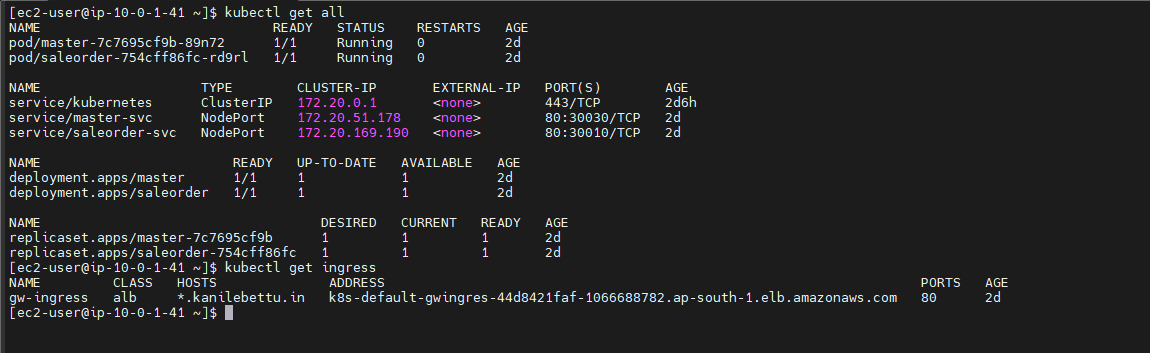
Here master microservices and alb_ingress is running as shown in below figure.