Git Flow & GIT BRANCHING STRATERGIES & SEMVER
Main Branches:
-
Master/main: The master branch represents the stable, production-ready state of your project. It should always contain working code that is ready to be deployed.
-
Master/main Branch is live in production ( stable and protected ).
-
A merge request /pull request is required to merge code into master/main.
-
-
Develop: The develop branch serves as an integration branch for various feature branches. It’s where new features are combined and tested before merging into the release branch.
-
Develop Branch is live in Development ( unstable ).
-
Supporting Branches:
Release Branches:
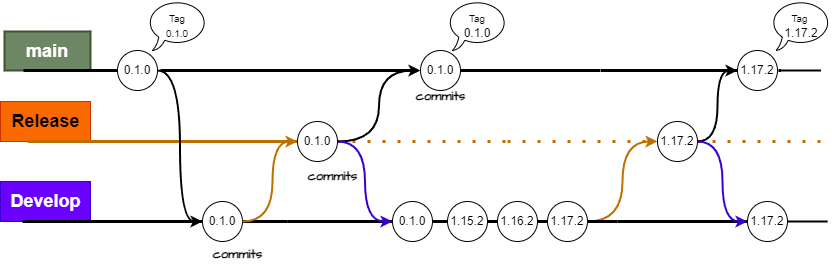
Release branches are created when you’re preparing for a new release. They are used to stabilize the code, fix bugs, and prepare for deployment. Once the release is ready, it’s merged into both the master/main and develop branches, and Major version X.Y.Z is Bumped and committed.
-
Create a merge request from the 'Develop' branch to the 'Release' branch. Then,
-
Test and stabilize the code on the release branch.
-
locally checkout to the 'Release' branch, pull from 'Develop', resolve merge conflicts, commit the changes, push to the remote repository, tag that commit, and write a release note differentiating old versus new changes:
-
No version bump
-
Take care about merge conflicts
-
Only merge working code with scrum master approval
-
Feature Branches:
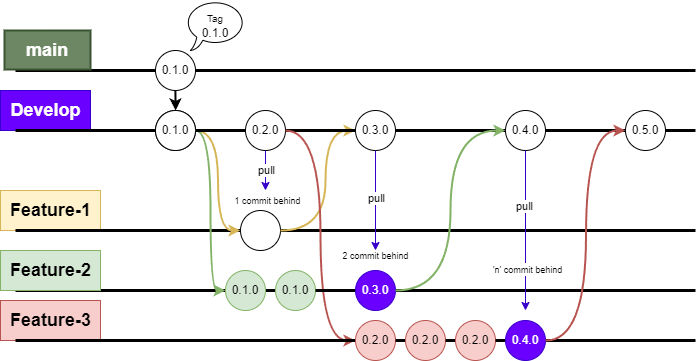
Feature branches are created for the development of specific features or enhancements. These branches are usually short-lived and are based off the develop branch. Once the feature is complete, it is merged back into the develop branch and Minor version X.Y.Z is Bumped and committed.
-
Create a new feature branch from the develop branch according to the request (following the most common practices), complete features, and thoroughly test them.
-
Making commits to the feature branch, Always pull from Develop.
-
After completing the feature, merge its branch back into the develop branch. The reviewer must ensure that the feature branch has an up-to-date commit history relative to the develop branch.
-
These branches are used for any maintenance feature /active development. ( unstable )
-
Remember the version will bump minor.
Hotfix Branches:
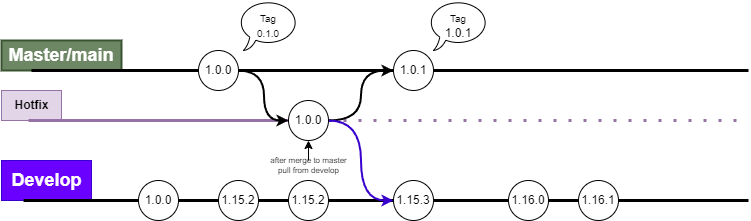
Hotfix branches are used to quickly address critical issues in the master branch. They are branched off from master, fixes are applied, and then merged back into both master/main and develop branches.
-
Create a hotfix branch from the master/main branch to fix critical issues in locally.
-
Apply the necessary fixes and test them.
-
Remember to merge the hotfix branch into both master/main and develop.
-
This is because develop might have moved on from the last published state.
Bugfix Branches:
Bugfix for Develop branch ex:
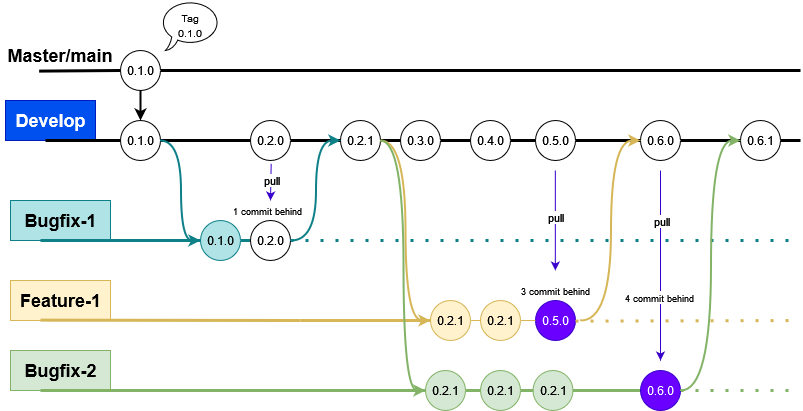
Bugfix for `Release branch ex:
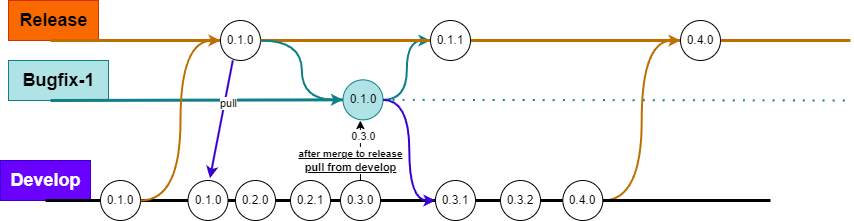
Bugfix branches are used for bug/defect fixing in support branch exists to provide updates to any previously released branches that might need patches and bugfixes.
-
This branch is only for release and develop to fix defects.
-
Create a Bugfix branch from the Develop or release branch to fix critical issues in locally.
-
Apply the necessary fixes and thoroughly test it.
-
Remember to merge when you are working on release-bugfix merge into both develop and release.
-
Remember to merge when you are working on develop-bugfix merge into develop.
-
The reviewer must ensure that the bugfix branch has an up-to-date commit history relative to the develop/release branch.
Release Bugfix merge request Explanation:
Create a branch from release, fix issues, and thoroughly test it. When merging to release, remember to bump the version (patch), and do not delete the branch after merging. Once merged, checkout to the bugfix branch, pull from Develop to get the latest code with the running version number (features or bug fixes), and merge to Develop. After merging to Develop, delete the bugfix branch.
NOTE:
-
Create issues according to requirements(feature/bugfix/hotfix) with scrum master approval.
-
Follow naming conventions strictly.
-
Testing is mandatory; if any code affects functionality, you are responsible for ensuring everything is done safely.
-
Complete features or bug fixes within the timeline and merge to target branches. If a branch exists for more than one sprint, we will be automatically deleted without any notification.
-
Follow MVP (Minimum Viable Product) principles and avoid implementing one or more features in a single branch; dedicate each feature to its own branch.
-
Do not create feature or bugfix branches without first creating an issue. Ensure that you maintain a proper Definition of Done (DOD) within the Requirement (issue) and update the Task Diary accordingly.
-
During merging, ensure to pull from the target branch and manually verify the version once, as it affects versioning and MVP. We cannot track this issue in the future.
-
Don’t make any mistakes; if you’re not confident, feel free to ask if you have any doubts.
Follow Git Flow and Branching Strategies.
-
A
developbranch is created frommain. -
A
releasebranch is created frommain. -
Featurebranches are created fromdevelop. -
When a
featureis complete it is merged into thedevelopbranch. -
When the
releasebranch is done it is merged intodevelopandmain. -
If an issue in
mainis detected ahotfixbranch is created frommain. -
Once the
hotfixis complete it is merged to bothdevelopandmain. -
Use Naming Convention:
feature/<issue number>/<your name>,hotfix/<issue number>/<your name>,bugfix/<issue number>/<your name>.
Additional Tip:
-
Start your day by pulling from the Develop branch to ensure you have the latest changes.
-
This practice helps prevent conflicts and ensures a smoother merging process.
-
-
Before merging check behind commit and push to respective branch.
-
Before merging any branch, always pull and push to/from the remote repository.
Don’t:
-
After completing a feature, merge the branch back into Develop.
-
Do not create another feature branch from an existing feature branch.
-
-
Each feature must be isolated from others. Avoid merging feature branches directly into each other.
-
Do not commit directly to protected branches(develop,release and main/master).
-
Ensure that you follow the naming conventions for branches; it will affect Version Bump.
SEMVER
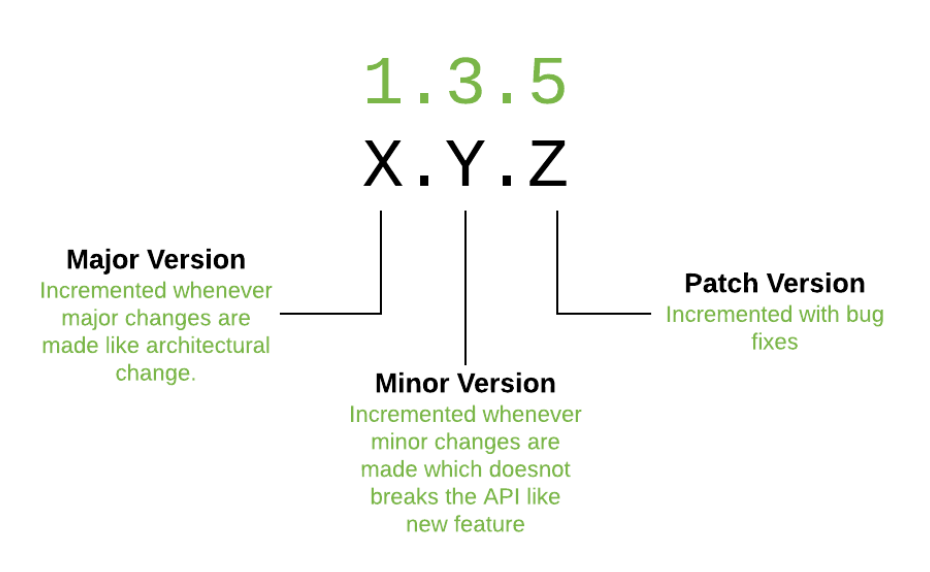
Semantic Versioning is a 3-component number in the format of X.Y.Z, where :
-
X stands for a major version. The leftmost number denotes a major version. When you increase the major version number, you increase it by one but you reset both patch version and minor versions to zero. If the current version is 2.6.9 then the next upgrade for a major version will be 3.0.0. Increase the value of X when breaking the existing API.
-
Y stands for a minor version. It is used for the release of new functionality in the system. When you increase the minor version, you increase it by one but you must reset the patch version to zero. If the current version is 2.6.9 then the next upgrade for a minor version will be 2.7.0. Increase the value of Y when implementing new features in a backward-compatible way.
-
Z stands for a Patch Versions: Versions for patches are used for bug fixes. There are no functionality changes in the patch version upgrades. If the current version is 2.6.9 then the next version for a patch upgrade will be 2.6.10. There is no limit to these numbers. Increase the value of Z when fixing bugs