Datasynchronization for ms_md_reports using lambda function with KMS encryption
Introduction
Data synchronization ensures strong eventual consistency, which means that all data replicas will eventually achieve the same consistent state across all microservices.
Create a function query on pgadmin4.
-
Go to mercodesk database → schemas → ms_md_reports → Functions .
Copy and paste the query inside the function and execute the query.
    CREATE OR REPLACE FUNCTION ms_md_reports.drop_copy_data_to_ms_reports() RETURNS void AS $$
    DECLARE
    source_db_name TEXT := 'mercodesk';
    destination_db_name TEXT := 'mercodesk';
    single_schema_name TEXT := 'ms_md_reports';

    -- List of source schemas to copy from
    source_schemas TEXT[] := ARRAY['ms_md_saleorder','ms_md_salespad','ms_md_salesbill','ms_md_summary','ms_md_journal','ms_md_master'];

    schema_name TEXT;
    table_name TEXT;
    full_table_name TEXT;
BEGIN
    -- Loop through all source schemas to drop tables
    FOR schema_name IN SELECT unnest(source_schemas)
    LOOP
        -- Loop through all tables in the current schema
        FOR table_name IN (SELECT t.table_name FROM information_schema.tables t WHERE t.table_schema = schema_name AND t.table_type = 'BASE TABLE')
        LOOP
            -- Generate the fully-qualified table name
            full_table_name := schema_name || '.' || table_name;

            -- Drop old data from the new schema
            EXECUTE 'DROP TABLE IF EXISTS ' || single_schema_name || '.' || table_name || ' CASCADE ;';
        END LOOP;
    END LOOP;

    -- Loop through all source schemas to create tables
    FOR schema_name IN SELECT unnest(source_schemas)
    LOOP
        -- Loop through all tables in the current schema
        FOR table_name IN (SELECT t.table_name FROM information_schema.tables t WHERE t.table_schema = schema_name AND t.table_type = 'BASE TABLE')
        LOOP
            -- Generate the fully-qualified table name
            full_table_name := schema_name || '.' || table_name;

            -- Insert updated data into the new schema
            EXECUTE 'CREATE TABLE IF NOT EXISTS ' || single_schema_name || '.' || table_name || ' AS SELECT * FROM ' || full_table_name;
        END LOOP;
    END LOOP;
END;
$$ LANGUAGE plpgsql;
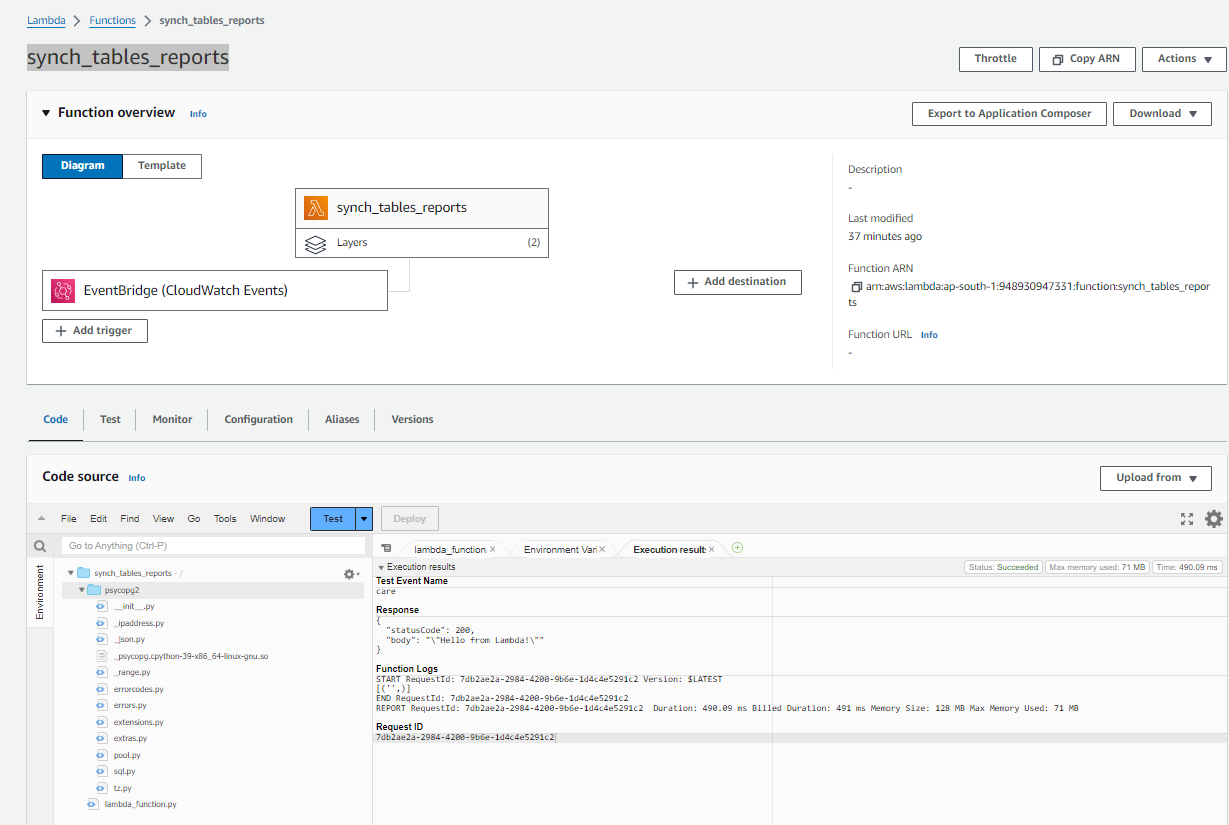
Create a lambda function to scheduling cron job to execute the query.
Login to AWS console → Lambda service → Create new function → Give name: synch_tables_reports and choose python 3.9 as runtime for the lambda function.
import os
import json
import psycopg2
import boto3

from base64 import b64decode

ENCRYPTED_RDS_PASSWORD = os.environ['RDS_PASSWORD']
ENCRYPTED_DATABASE_USER = os.environ['DATABASE_USER']

def get_decrypted(name):
    return boto3.client('kms').decrypt(
        CiphertextBlob=b64decode(name),
        EncryptionContext={'LambdaFunctionName': os.environ['AWS_LAMBDA_FUNCTION_NAME']}
    )['Plaintext'].decode('utf-8')

DECRYPTED_RDS_PASSWORD=get_decrypted(ENCRYPTED_RDS_PASSWORD)
DECRYPTED_DATABASE_USER=get_decrypted(ENCRYPTED_DATABASE_USER)


def lambda_handler(event, context):
    execute_query()
    return {
        'statusCode': 200,
        'body': json.dumps('Hello from Lambda!')
    }


def get_connection():
    try:
        return psycopg2.connect(
            database=os.environ['DATABASE_NAME'],
            user=DECRYPTED_DATABASE_USER,
            password=DECRYPTED_RDS_PASSWORD,
            host=os.environ['HOST_NAME'],
            port=5432,
        )
    except:
        return False

def execute_query():
    conn = get_connection()
    # CREATE A CURSOR USING THE CONNECTION OBJECT
    curr = conn.cursor()
    # EXECUTE THE SQL QUERY
    curr.execute(" select * from ms_md_reports.drop_copy_data_to_ms_reports(); ")
    conn.commit()
    results=curr.fetchall()
    print(results)

    conn.close()
Import the package by running command,
pip install psycopg2on the command prompt/ window powershell. Create a lambda_function.py file & paste above lambda code and zip it along with the package downloaded.
upload the zip file on lambda console and test the function.
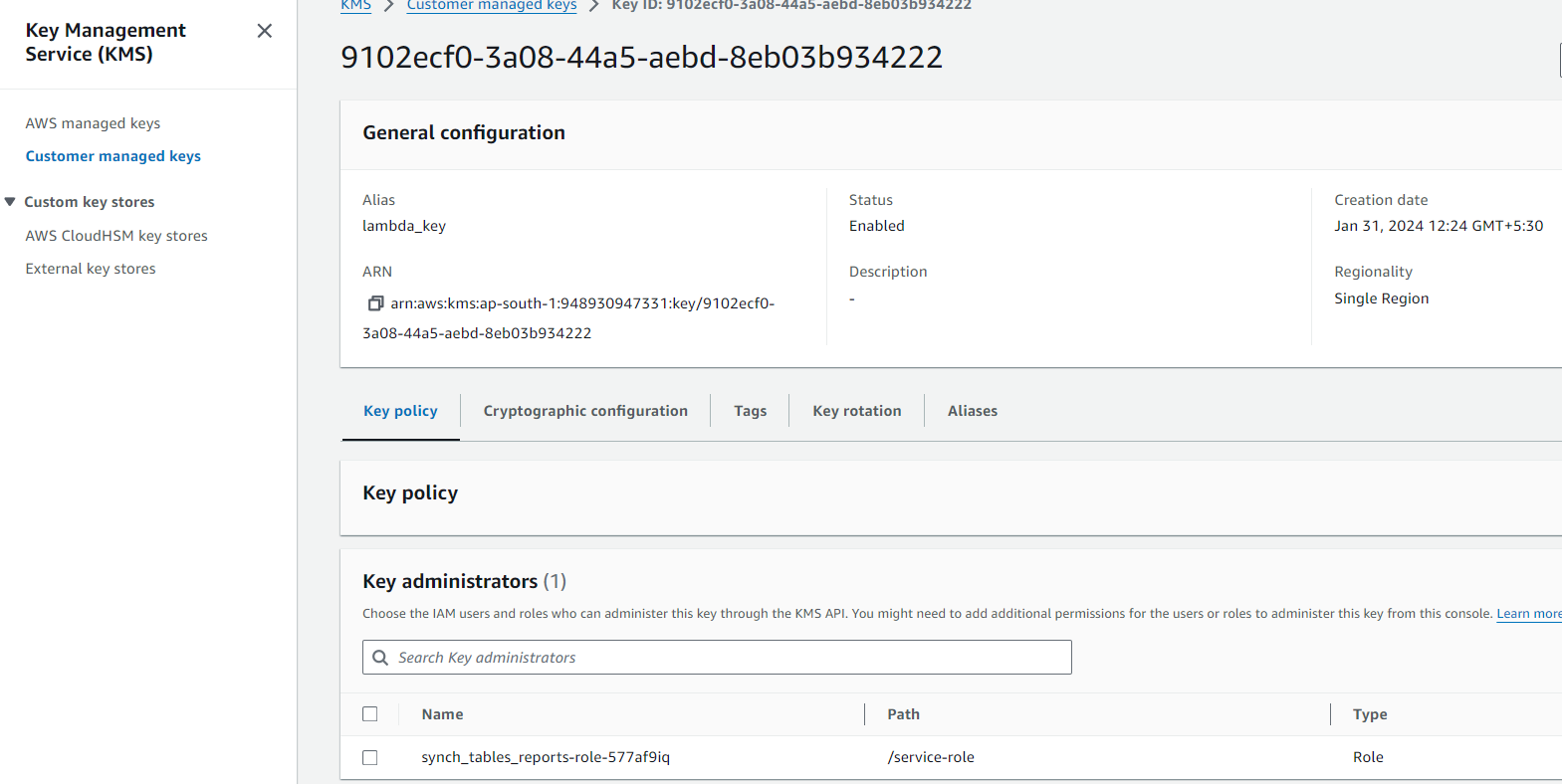
Create a KMS key on console and provide name as lambda_key and select the role that is created on lambda creation under key policy.
Securing environment variables
For securing your environment variables, you can use server-side encryption to protect your data at rest and client-side encryption to protect your data in transit.
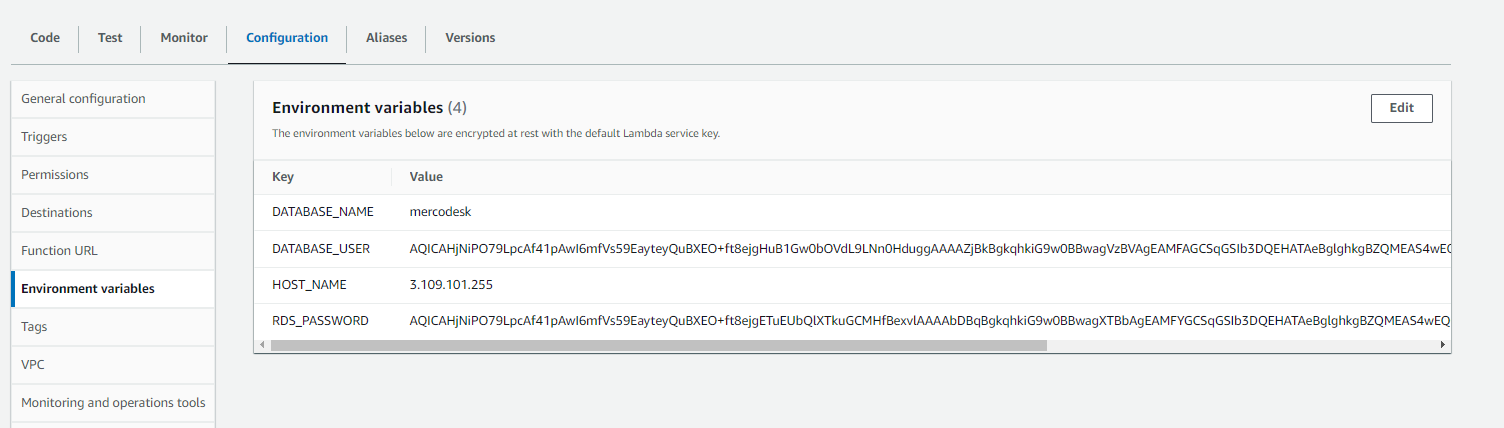
Security in transit: For additional security, it can enable helpers for encryption in transit, which ensures that environment variables are encrypted client-side for protection in transit.
Inside the function, choose Configuration → Environment variables → Edit → Expand Encryption configuration
Under Encryption in transit, choose Enable helpers for encryption in transit.
Choose Encrypt next to the environment variable. Fill in the details given in the diagram
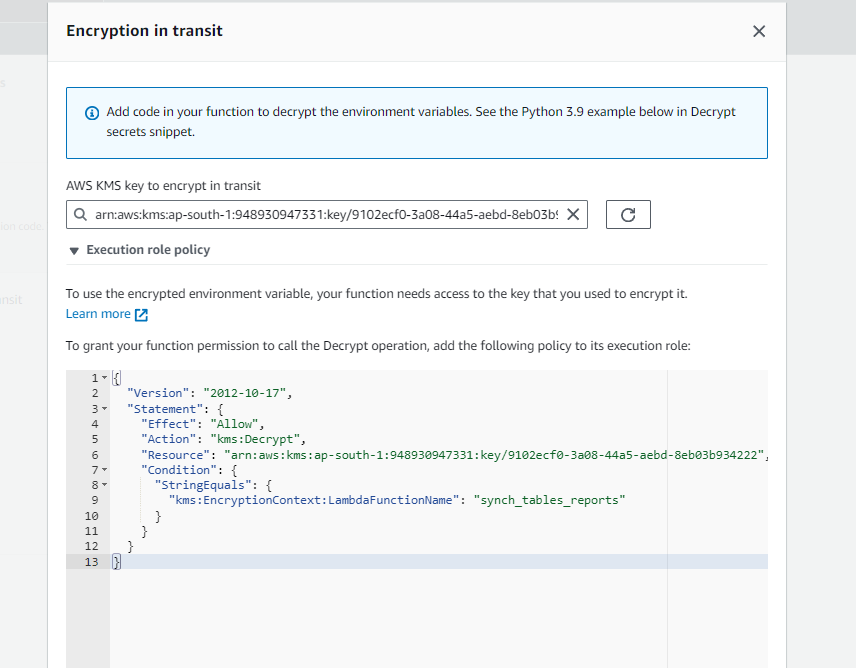
Under AWS KMS key to encrypt in transit, choose a customer managed key created at step-4.
Choose Execution role policy and copy the policy. This policy grants permission to function’s execution role to decrypt the environment variables.
Save this policy to use in the last step of this procedure.
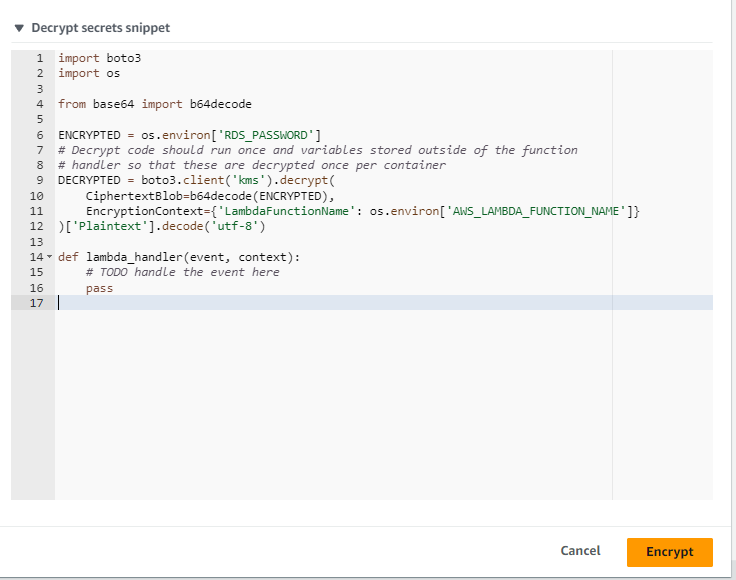
Add code to the function that decrypts the environment variables given under Decrypt secrets snippet.
Here the password environment variable is encrypted and decrypted, so mention password as decrypted.
def get_connection():
    try:
    return psycopg2.connect(
        database=os.environ['DATABASE_NAME'],
        user=DECRYPTED_DATABASE_USER,
        password=decrypted,
        host=os.environ['HOST_NAME'],
        port=5432,
)
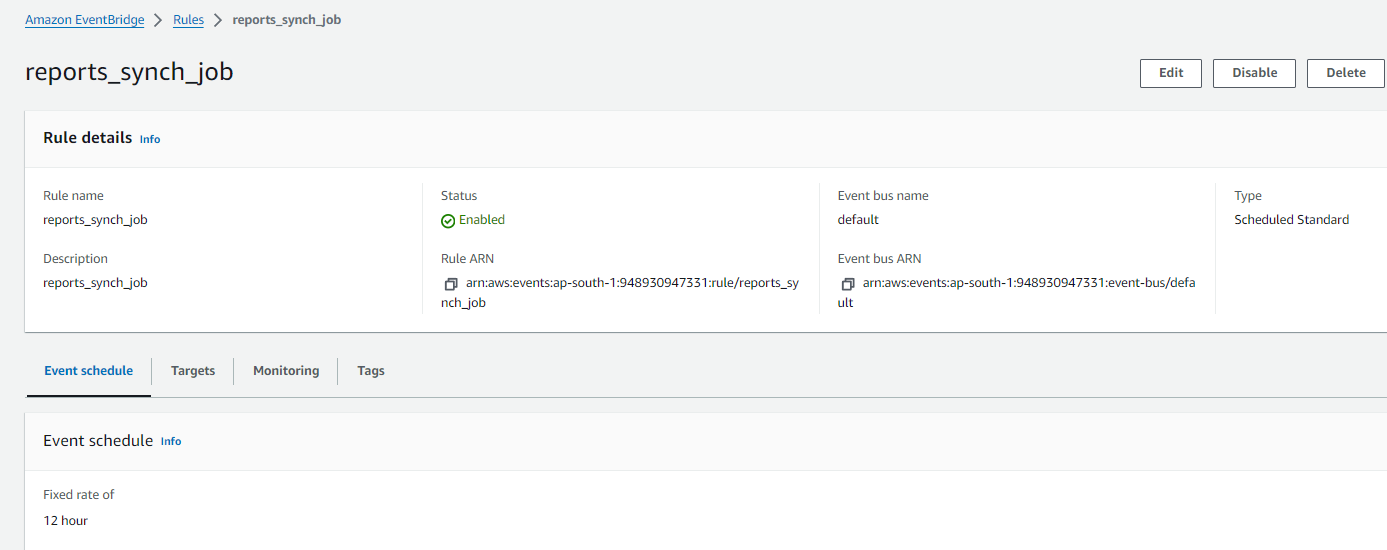
Add trigger to this lambda function with cloudwatch eventbridge, for data synchronization. Here this lambda will be triggered automatically once in 12 hour and data of reports will be synched with other microservices.