Kubernetes Cluster Autoscaling(CA)using AWS EKS
Kubernetes has 3 types of autoscaling groups.
-
Cluster Autoscaling (CA).
-
Horizontal Pod Autoscaling(HPA).
Cluster Autoscaling (CA).
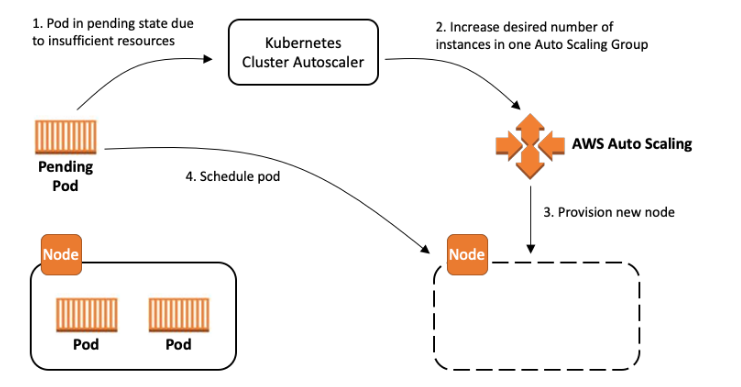
Create an IAM Policy For Worker Node
-
After the creation of EKS, The Cluster Autoscaler requires the following IAM permissions to make calls to AWS APIs on your behalf.
-
Go to IAM Console → Select Roles → Select the Worker node role.
-
Click on Add inline policy, and make a Custom policy with the following policy.
IAM Policy.
{
    "Version": "2012-10-17",
    "Statement": [
        {
            "Effect": "Allow",
            "Action": [
                "autoscaling:SetDesiredCapacity",
                "autoscaling:TerminateInstanceInAutoScalingGroup"
            ],
            "Resource": "*",
            "Condition": {
                "StringEquals": {
                    "aws:ResourceTag/k8s.io/cluster-autoscaler/enabled": "true",
                    "aws:ResourceTag/k8s.io/cluster-autoscaler/sample": "owned"
                }
            }
        },
        {
            "Effect": "Allow",
            "Action": [
                "autoscaling:DescribeAutoScalingGroups",
                "autoscaling:DescribeAutoScalingInstances",
                "autoscaling:DescribeLaunchConfigurations",
                "autoscaling:DescribeScalingActivities",
                "autoscaling:DescribeTags",
                "ec2:DescribeImages",
                "ec2:DescribeInstanceTypes",
                "ec2:DescribeLaunchTemplateVersions",
                "ec2:GetInstanceTypesFromInstanceRequirements",
                "eks:DescribeNodegroup"
            ],
            "Resource": "*"
        }
    ]
}
Paste this policy and create a custom policy.
Worker node ASG
-
Go to the EC2 Autoscaling group, you see there an autoscaling group of the EKS.
-
Check the min and max configuration of your worker nodes.
-
if your max capacity=2 and you already launch a 2 worker node, the Cluster Autoscaler not Spain the new node when the load is increased.
Deploy the Cluster Autoscaler
Deploy the Cluster Autoscaler to your cluster with the following command
kubectl apply -f https://raw.githubusercontent.com/kubernetes/autoscaler/master/cluster-autoscaler/cloudprovider/aws/examples/cluster-autoscaler-autodiscover.yaml-
Add the cluster-autoscaler.kubernetes.io/safe-to-evict annotation to the deployment with the following command.
kubectl -n kube-system annotate deployment.apps/cluster-autoscaler cluster-autoscaler.kubernetes.io/safe-to-evict="false"-
Edit the Cluster Autoscaler deployment with the following command.
kubectl -n kube-system edit deployment.apps/cluster-autoscalerEdit the cluster-autoscaler container command to replace <YOUR CLUSTER NAME> with your cluster’s name, and add the following options.
--balance-similar-node-groups
--skip-nodes-with-system-pods=false
Save and close the file to apply the changes.
spec:
      containers:
      - command:
        - ./cluster-autoscaler
        - --v=4
        - --stderrthreshold=info
        - --cloud-provider=aws
        - --skip-nodes-with-local-storage=false
        - --expander=least-waste
        - --node-group-auto-discovery=asg:tag=k8s.io/cluster-autoscaler/enabled,k8s.io/cluster-autoscaler/<YOUR CLUSTER NAME>
        - --balance-similar-node-groups
        - --skip-nodes-with-system-pods=false