Infrastructure changes for ISTIO
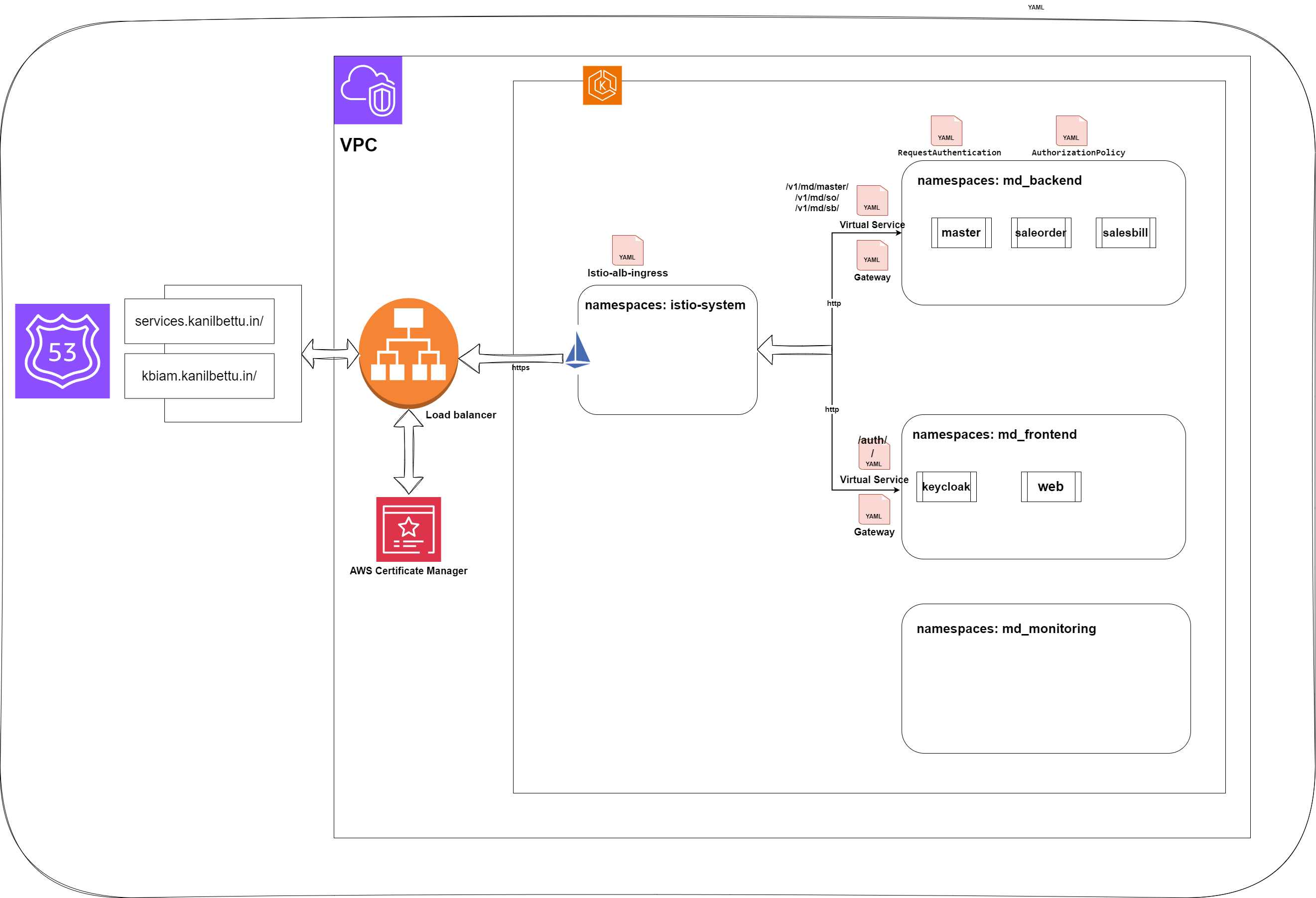
2 Istio
2.1 Gateway
-
A gateway1 can be used to manage inbound and outbound traffic for mesh.
-
Gateway configurations are applied to standalone Envoy proxies that are running at the edge of the mesh, rather than sidecar Envoy proxies running alongside your service workloads.
-
Unlike other mechanisms for controlling traffic entering your systems, such as the Kubernetes Ingress APIs, Istio gateways let you use the full power and flexibility of Istio’s traffic routing.
-
Gateway resource allows to configure layer 4-6 load balancing properties such as ports to expose, TLS settings, and so on. Then instead of adding application-layer traffic routing (L7) to the same API resource, you bind a regular Istio virtual service2 to the gateway. This allows manage gateway traffic like any other data plane traffic in an Istio mesh.
-
The specification describes a set of ports that should be exposed, the type of protocol to use, SNI configuration for the load balancer, etc.
-
https://istio.io/latest/docs/reference/config/networking/gateway/#Gateway
apiVersion: networking.istio.io/v1alpha3
kind: Gateway
metadata:
  name: istio-gateway
  namespace: services
spec:
  selector:
    istio: ingressgateway
  servers:
    - port:
        number: 80
        name: http
        protocol: HTTP
      # tls:
      #   mode: SIMPLE
      #   credentialName: "tls-secret"
      hosts:
        - "*"
2.2 Virtual Service
-
A virtual service lets us configure how requests are routed to a service within an Istio service mesh.
-
Each virtual service consists of a set of routing rules that are evaluated in order, letting Istio match each given request to the virtual service to a specific real destination within the mesh.
-
https://istio.io/latest/docs/concepts/traffic-management/#virtual-services
apiVersion: networking.istio.io/v1alpha3
kind: VirtualService
metadata:
  name: backend-servcies
  namespace: services
spec:
  hosts:
    - "*" # This will match any host header
  gateways:
    - istio-gateway
  http:
    - match:
        - uri:
            prefix: /v1/md/master/
      route:
      - destination:
          host: master-svc
          port:
            number: 80
    - match:
        - uri:
            prefix: /v1/md/so/
      route:
      - destination:
          host: saleorder-svc
          port:
            number: 80
2.3 Authentication
-
Istio provides two types of authentication:
-
Peer authentication: used for secure service-to-service authentication to verify the client making the connection. Istio offers mutual TLS3 as a full stack solution for transport authentication, which can be enabled without requiring service code changes.
ex:apiVersion: security.istio.io/v1beta1 kind: PeerAuthentication metadata: name: default namespace: services spec: mtls: mode: STRICT
-
Request authentication:
-
Used for end-user authentication to verify the credential attached to the request. Istio enables request-level authentication with JSON Web Token (JWT) validation and a streamlined developer experience using a custom authentication provider or any OpenID Connect providers.
-
apiVersion: security.istio.io/v1beta1
kind: RequestAuthentication
metadata:
name: jwt-check-master
namespace: services
spec:
selector:
matchLabels:
app: master
jwtRules:
- issuer: https://kbiam.kanilebettu.in/auth/realms/kbt-india
jwksUri: https://kbiam.kanilebettu.in/auth/realms/kbt-india/protocol/openid-connect/certs
forwardOriginalToken: true
fromHeaders:
- name: Authorization   # Specify the header name where the JWT token is sent
# prefix: "Bearer "    # If your token has a prefix (e.g., "Bearer ")
2.4 Authorization
-
Istio’s authorization features provide mesh-, namespace-, and workload-wide access control for your workloads in the mesh. This level of control provides the following benefits:
-
Workload-to-workload and end-user-to-workload authorization.
-
A simple API: it includes a single AuthorizationPolicy CRD4, which is easy to use and maintain.
-
Flexible semantics: operators can define custom conditions on Istio attributes, and use CUSTOM, DENY and ALLOW actions.
-
High performance: Istio authorization ( ALLOW and DENY ) is enforced natively on Envoy.
-
High compatibility: supports gRPC, HTTP, HTTPS and HTTP/2 natively, as well as any plain TCP protocols.
-
https://istio.io/latest/docs/reference/config/security/authorization-policy/
-
apiVersion: security.istio.io/v1beta1
kind: AuthorizationPolicy
metadata:
  name: user-check-master
  namespace: services
spec:
  selector:
    matchLabels:
      app: master
  rules:
    - from:
        - source:
            requestPrincipals: ["*"] # Allow any authenticated user
2.5 Ingress
Each ingress resource will create a public/private ALB based on the alb.ingress.kubernetes.io/scheme mentioned and a route record in the Route 53 public/private zone based on the ingress.kind in the configuration
apiVersion: networking.k8s.io/v1
kind: Ingress
metadata:
  name: eks-alb-public-ingress
  namespace: istio-system
  annotations:
    #kubernetes.io/ingress.class: alb
    alb.ingress.kubernetes.io/scheme: internet-facing
    #alb.ingress.kubernetes.io/target-type: ip
    alb.ingress.kubernetes.io/healthcheck-path: /healthz/ready
    alb.ingress.kubernetes.io/healthcheck-port: status-port
    alb.ingress.kubernetes.io/healthcheck-interval-seconds: "30"
    alb.ingress.kubernetes.io/healthy-threshold-count: "3"
    alb.ingress.kubernetes.io/unhealthy-threshold-count: "3"
    alb.ingress.kubernetes.io/loadbalancer: istio-public-alb
    alb.ingress.kubernetes.io/backend-protocol: HTTP
    alb.ingress.kubernetes.io/ssl-policy: ELBSecurityPolicy-FS-1-2-Res-2020-10
    alb.ingress.kubernetes.io/listen-ports: '[{"HTTP": 80}, {"HTTPS":443}]'
    # alb.ingress.kubernetes.io/actions.ssl-redirect: '443'
    alb.ingress.kubernetes.io/certificate-arn: arn:aws:acm:ap-south-1:948930947331:certificate/b2ab6c06-f3d4-4658-9dee-172b28b86e8e
    alb.ingress.kubernetes.io/subnets: subnet-0e9ff8366bfabb8dc,subnet-0a6a93e97bc05102d
    ingress.kind: external
    istio: istio-ingressgateway
spec:
  ingressClassName: alb
  rules:
  - host: "*.kanilebettu.in"
  - http:
      paths:
        - path: /
          pathType: Prefix
          backend:
            service:
              name: istio-ingressgateway
              port:
                number: 80