Secrets Manager For EKS Cluster Using Helm Chart
1. Pre-requisites
-
EKS cluster running with terraform apply
-
IAM user with administrator permissions
-
Kubectl is configured to EKS cluster
-
Helm v3 is installed on local machine
-
AWS CLI is configured to execute commands
2. Introduction
The best practice for managing secrets in Kubernetes and how to integrate with AWS Secrets Manager to enhance security and simplify management.
3. Secrets Manager CSI driver Deployment
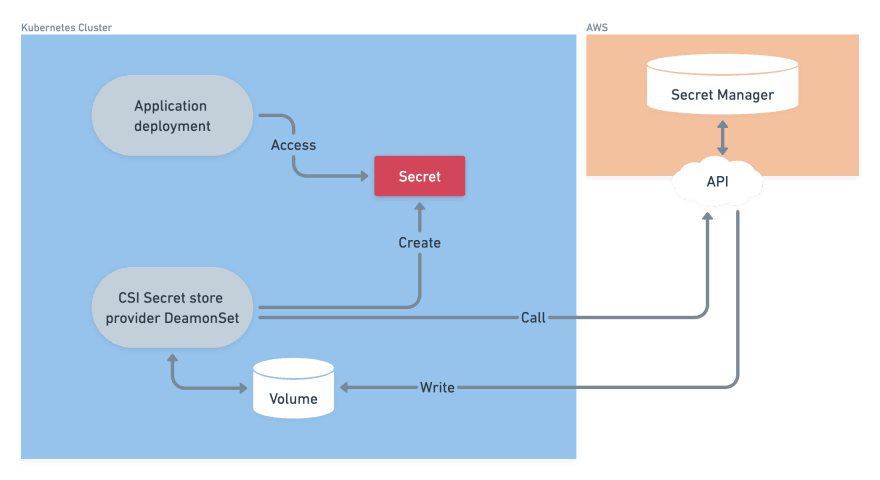
Enable Kubernetes to access AWS Secrets Manager, we’ll use the Secrets Manager CSI Driver. To deploy the CSI driver using Helm, run the following commands:
helm repo add secrets-store-csi-driver https://kubernetes-sigs.github.io/secrets-store-csi-driver/charts
helm install csi-secrets-store secrets-store-csi-driver/secrets-store-csi-driver --namespace kube-system --set syncSecret.enabled=true --set enableSecretRotation=true
Enabling Kubernetes secrets sync and secret rotation will automatically update the Kubernetes secret object with the latest secret value from AWS Secrets Manager, which helps to ensure that Kubernetes applications always have access to the most up-to-date secret value.
Verify the installation using the command,
kubectl get daemonsets -n kube-system -l app.kubernetes.io/instance=csi-secrets-store
To customize the deployment of the Secrets Manager CSI driver, refer to the official documentation at https://secrets-store-csi-driver.sigs.k8s.io/getting-started/installation.html.
4. Secrets Manager CSI driver Provider Deployment
To enable Kubernetes to retrieve secrets from AWS Secrets Manager, deploy the Secrets Manager CSI provider for AWS.
helm repo add aws-secrets-manager https://aws.github.io/secrets-store-csi-driver-provider-aws
helm install -n kube-system secrets-provider-aws aws-secrets-manager/secrets-store-csi-driver-provider-aws
Verify the installation using the command,
kubectl get daemonsets -n kube-system -l app=secrets-store-csi-driver-provider-aws
To customize the deployment, check the official documentation: https://aws.github.io/secrets-store-csi-driver-provider-aws/

5. Create a Secret in Secrets Manager
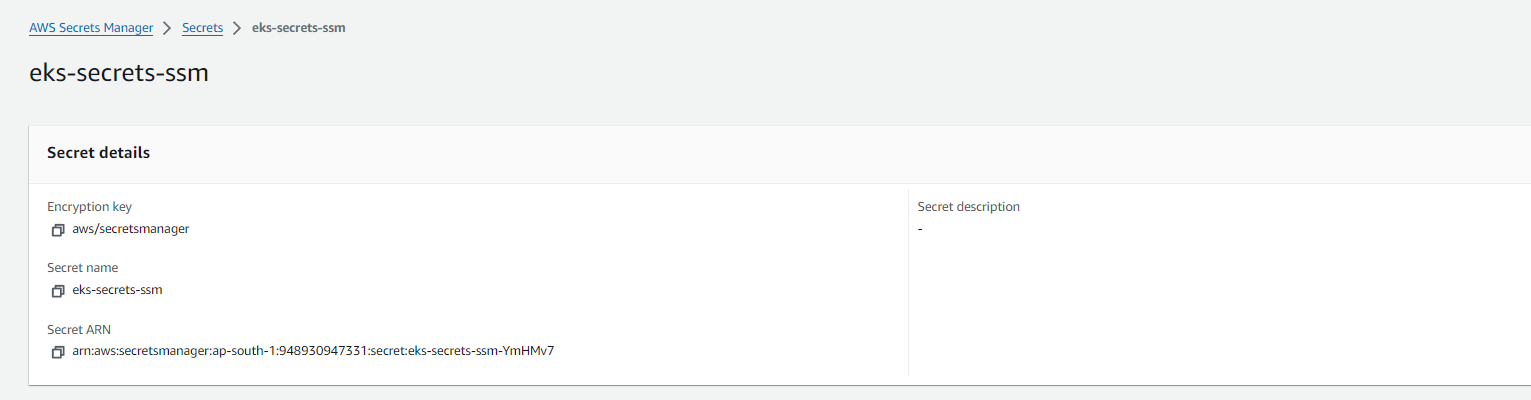
To test the integration between EKS and AWS Secrets Manager, create a secret in Secrets Manager within the same region as EKS cluster.
After creating the test secret, make note of the secret’s ARN or name, which will be used in the Secret Provider Class manifest.
The ARN or name uniquely identifies the secret and allows the Kubernetes service account to retrieve the required secrets from AWS Secrets Manager.
6. Create IAM role for the service account
To allow the Kubernetes service account to retrieve secrets from AWS Secrets Manager, an IAM role with the necessary permissions must be created.
{
  "Version": "2012-10-17",
  "Statement": [
    {
      "Effect": "Allow",
      "Action": [
          "secretsmanager:GetSecretValue",
          "secretsmanager:DescribeSecret"
      ],
      "Resource": [
          "<arn of your secret>"
      ]
    }
  ]
}
7. Create a namespace named services & the inject istio to that namespace using the command,
kubectl create namespace services
kubectl label namespace services istio-injection=enabled --overwrite
kubectl get namespace -L istio-injection
Kubernetes users can easily and securely access the secrets they need to operate their applications by using the Secret Provider Class and mounting secrets as a volume. In this docs , there will be two methods for secret configuration one is on yaml and other is on helm chart.
8. Environment secrets configuration on yaml
8.1. Create Service Account
A service account must be annotated with the IAM role ARN to allow pods to retrieve secrets from AWS Secrets Manager.
apiVersion: v1
kind: ServiceAccount
metadata:
  name: secrets-manager-access-sa
  namespace: services # Your prefered namespace
  annotations:
    eks.amazonaws.com/role-arn: < Your IAM Role ARN >
8.2. Create a secret provider class.
The Secret Provider Class custom resource definition (CRD) retrieves secrets from AWS Secrets Manager and creates Kubernetes Secret objects. The Secret Provider Class defines a Kubernetes object that maps to a secret stored in AWS Secrets Manager. Once the mapping is established, the Secret Provider Class retrieves the secret from AWS Secrets Manager and creates a Kubernetes Secret object, which the application can use. This process helps to simplify secret management and improve the security of Kubernetes applications.
apiVersion: secrets-store.csi.x-k8s.io/v1
kind: SecretProviderClass
metadata:
  name: aws-secrets
  namespace: services # Your prefered namespace
spec:
  provider: aws
  secretObjects:
  - secretName: k8s-secret
    type: Opaque
    data:
  - objectName: RDS_USERNAME
    key: RDS_USERNAME
  - objectName: RDS_PASSWORD
    key: RDS_PASSWORD
  parameters:
    objects: |
      - objectName: "eks-secrets-ssm"
        objectType: "secretsmanager"

        jmesPath:
            - path: RDS_USERNAME
              objectAlias: RDS_USERNAME
            - path: RDS_PASSWORD
              objectAlias: RDS_PASSWORD
8.3. Create master.yaml for pod, service, gateway, virtual service and ingress alb for accessing the microservice.
apiVersion: apps/v1
kind: Deployment
metadata:
  name: master
  namespace: services
  labels:
    app: master
spec:
  selector:
    matchLabels:
      app: master
  replicas: 1
  strategy:
    rollingUpdate:
      maxSurge: 25%
      maxUnavailable: 25%
    type: RollingUpdate
  template:
    metadata:
      labels:
        app: master
    spec:
      serviceAccountName: secrets-manager-access-sa
      volumes:
      - name: secrets-store-inline
        csi:
          driver: secrets-store.csi.k8s.io
          readOnly: true
          volumeAttributes:
            secretProviderClass: aws-secrets
      containers:
      - name: master
        image: xxxxxxxxxxxxx.dkr.ecr.<region>.amazonaws.com/<reop_url>:<image_name:<tag>>
        imagePullPolicy: Always
        env:
          - name: KB_CERTS
            value: {{ .Values.env.KB_CERTS }}
          - name: KB_CLIENT_ID
            value: {{ .Values.env.KB_CLIENT_ID }}
          - name: KB_CLIENT_SECRET
            value: {{ .Values.env.KB_CLIENT_SECRET }}
          - name: KB_IAM_HOSTNAME
            value: {{ .Values.env.KB_IAM_HOSTNAME }}
          - name: KB_MD_ADMIN_PASSWORD
            value: {{ .Values.env.KB_MD_ADMIN_PASSWORD }}
          - name: KB_MD_ADMIN_USER
            value: {{ .Values.env.KB_MD_ADMIN_USER }}
          - name: RDS_DB_NAME
            value: {{ .Values.env.RDS_DB_NAME }}
          - name: RDS_HOSTNAME
            value: {{ .Values.env.RDS_HOSTNAME | quote }}
          - name: RDS_PORT
            value: {{ .Values.env.RDS_PORT | quote }}
          - name: RDS_USERNAME
            value: {{ .Values.env.RDS_USERNAME }}
          - name: RDS_PASSWORD
            valueFrom:
              secretKeyRef:
                name: k8s-secret
                key: RDS_PASSWORD
          - name: RDS_PORT
            value: "5432"
          - name: RDS_USERNAME
            valueFrom:
              secretKeyRef:
                name: k8s-secret
                key: RDS_USERNAME
        volumeMounts:
        - name: secrets-store-inline
          mountPath: "/mnt/db/secrets"
          readOnly: true

        resources:
          requests:
            memory: "200Mi"
            cpu: "250m"
          limits:
            memory: "400Mi"
            cpu: "400m"
        livenessProbe:
          httpGet:
            path: /v1/md/master/health/
            port: 3030
          initialDelaySeconds: 30
          periodSeconds: 30
        readinessProbe:
          httpGet:
            path: /v1/md/master/health/
            port: 3030
          initialDelaySeconds: 30
          periodSeconds: 5
        ports:
          - containerPort: 3030
      # imagePullSecrets:
      #   - name: ecr

---
apiVersion: v1
kind: Service
metadata:
  name: master-svc   # Name your service accordingly
  namespace: services
  labels:
    app: master
  annotations:
    se7entyse7en.prometheus/scrape: "true"
    se7entyse7en.prometheus/scheme: "http"
    se7entyse7en.prometheus/path: "/actuator/prometheus"
    se7entyse7en.prometheus/port: "3030"
spec:
  type: ClusterIP         # Set the service type to NodePort
  ports:
  - port: 80
    targetPort: 3030    # Port your application is listening on
    protocol: TCP
  selector:
    app: master


---

apiVersion: networking.istio.io/v1alpha3
kind: Gateway
metadata:
  name: istio-gateway
  namespace: services
spec:
  selector:
    istio: ingressgateway
  servers:
    - port:
        number: 80
        name: http
        protocol: HTTP
      # tls:
      #   mode: SIMPLE
      #   credentialName: "tls-secret"
      hosts:
        - "*"
---

apiVersion: networking.istio.io/v1alpha3
kind: VirtualService
metadata:
  name: backend-servcies
  namespace: services
spec:
  hosts:
    - "*" # This will match any host header
  gateways:
    - istio-gateway
  http:
    - match:
        - uri:
            prefix: /v1/md/master/
      route:
      - destination:
          host: master-svc
          port:
            number: 80
    - match:
        - uri:
            prefix: /v1/md/so/
      route:
      - destination:
          host: saleorder-svc
          port:
            number: 80
9. Environment variables as secrets configuration on helm chart
9.1. Create Service Account
A service account must be annotated with the IAM role ARN to allow pods to retrieve secrets from AWS Secrets Manager.
#####  serviceaccount.yaml #####
apiVersion: v1
kind: ServiceAccount
metadata:
  name: {{ .Values.ServiceAccount.name }}
  namespace: {{ .Values.namespace }} # Your prefered namespace
  labels:
    {{- include "ms_md_master.labels" . | nindent 4 }}

  annotations:

    eks.amazonaws.com/role-arn: {{ .Values.ServiceAccount.role_arn }}
9.2. Create a secret provider class.
The Secret Provider Class custom resource definition (CRD) retrieves secrets from AWS Secrets Manager and creates Kubernetes Secret objects. The Secret Provider Class defines a Kubernetes object that maps to a secret stored in AWS Secrets Manager. Once the mapping is established, the Secret Provider Class retrieves the secret from AWS Secrets Manager and creates a Kubernetes Secret object, which the application can use. This process helps to simplify secret management and improve the security of Kubernetes applications.
#####  secrets.yaml #####
apiVersion: secrets-store.csi.x-k8s.io/v1
kind: SecretProviderClass
metadata:
  name: "{{ .Values.SecretProviderClass.secretProviderName }}"
  namespace: "{{ .Values.namespace }}"  # Your prefered namespace
spec:
  provider: "{{ .Values.SecretProviderClass.provider }}"
  secretObjects:
  - secretName: "{{ .Values.SecretProviderClass.secretName }}"
    type: Opaque
    data:
    - objectName: RDS_USERNAME
      key: RDS_USERNAME
    - objectName: RDS_PASSWORD
      key: RDS_PASSWORD
  parameters:
    objects: |
      - objectName: "{{ .Values.SecretProviderClass.objectName }}"
        objectType: "secretsmanager"

        jmesPath:
            - path: RDS_USERNAME
              objectAlias: RDS_USERNAME
            - path: RDS_PASSWORD
              objectAlias: RDS_PASSWORD
9.3. Create master.yaml for pod, service, gateway, virtual service and ingress alb for accessing the microservice.
#####  deployment.yaml #####
apiVersion: apps/v1
kind: Deployment
metadata:
  name: {{ .Release.Name }}
  namespace: {{ .Values.namespace }}
  labels:
    {{- include "ms_md_master.labels" . | nindent 4 }}
spec:
  selector:
    matchLabels:
      {{- include "ms_md_master.labels" . | nindent 6 }}
  replicas: {{ .Values.replicaCount }}
  strategy:
    rollingUpdate:
      maxSurge: 25%
      maxUnavailable: 25%
    type: RollingUpdate
  template:
    metadata:
      labels:
        {{- include "ms_md_master.labels" . | nindent 8 }}
    spec:
      serviceAccountName: {{ .Values.ServiceAccount.name }}
      volumes:
      - name: secrets-store-inline
        csi:
          driver: secrets-store.csi.k8s.io
          readOnly: true
          volumeAttributes:
            secretProviderClass: "{{ .Values.SecretProviderClass.secretProviderName }}"
      containers:
      - name: {{ .Values.containers.name }}
        image: {{ .Values.image.repository | quote }}
        imagePullPolicy: {{ .Values.image.pullpolicy }}
        env:
          - name: KB_CERTS
            value: lwpNbyjCWdxY1QJD3C_lLEbo1Q-9Ar1ciDvwbpDDxR8
          - name: KB_CLIENT_ID
            value: mercotrace-india
          - name: KB_CLIENT_SECRET
            value: dqUGB9zCd02I73Xb6C9jGQx9CHxZkytw
          - name: KB_IAM_HOSTNAME
            value: kbiam.kanilebettu.in/auth
          - name: KB_MD_ADMIN_PASSWORD
            value: sa
          - name: KB_MD_ADMIN_USER
            value: msuser
          - name: RDS_DB_NAME
            value: mercodesk
          - name: RDS_HOSTNAME
            value: "3.109.101.255"
          - name: RDS_PASSWORD
            valueFrom:
              secretKeyRef:
                name: "{{ .Values.SecretProviderClass.secretName }}"
                key: RDS_PASSWORD
          - name: RDS_PORT
            value: "5432"
          - name: RDS_USERNAME
            valueFrom:
              secretKeyRef:
                name: "{{ .Values.SecretProviderClass.secretName }}"
                key: RDS_USERNAME
        volumeMounts:
          - name: secrets-store-inline
            mountPath: "/mnt/db/secrets"
            readOnly: true
        ports:
          - containerPort: {{ .Values.containers.containerPort }}
        resources:
          requests:
            memory: {{ .Values.resources.requests_memory | quote  }}
            cpu: {{ .Values.resources.requests_cpu | quote  }}
          limits:
            memory: {{ .Values.resources.limits_memory | quote  }}
            cpu: {{ .Values.resources.limits_cpu | quote  }}
        livenessProbe:
          httpGet:
            path: {{ .Values.livenessProbe.path }}
            port: {{ .Values.livenessProbe.port }}
          initialDelaySeconds: {{ .Values.livenessProbe.initialDelaySeconds }}
          periodSeconds: {{ .Values.livenessProbe.periodSeconds }}
        readinessProbe:
          httpGet:
            path: {{ .Values.readinessProbe.path }}
            port: {{ .Values.readinessProbe.port }}
          initialDelaySeconds: {{ .Values.readinessProbe.initialDelaySeconds }}
          periodSeconds: {{ .Values.readinessProbe.periodSeconds }}

---
#####  service.yaml #####
apiVersion: v1
kind: Service
metadata:
  name: {{ .Release.Name }}
  namespace: {{ .Values.namespace }}
  labels:
    {{- include "ms_md_master.labels" . | nindent 4 }}
  annotations:
    se7entyse7en.prometheus/scrape: "true"
    se7entyse7en.prometheus/scheme: "http"
    se7entyse7en.prometheus/path: "/actuator/prometheus"
    se7entyse7en.prometheus/port: "3030"
spec:
  type: {{ .Values.service.type}}
  ports:
  - port: {{ .Values.service.http_port }}
    name: http
    targetPort: {{ .Values.containers.containerPort}}
    protocol: TCP
  selector:
    {{- include "ms_md_master.labels" . | nindent 4 }}

---
#####  istio_gateway.yaml #####
apiVersion: networking.istio.io/v1alpha3
kind: Gateway
metadata:
  name: istio-gateway
  namespace: {{ .Values.namespace}}
spec:
  selector:
    istio: ingressgateway
  servers:
    - port:
        number: {{ .Values.Gateway.servers_portnumber}}
        name: http
        protocol: HTTP
      # tls:
      #   mode: SIMPLE
      #   credentialName: "tls-secret"
      hosts:
        - {{ .Values.Gateway.hostsname | quote  }}

---
#####  istio_virtualservice.yaml #####
apiVersion: networking.istio.io/v1alpha3
kind: VirtualService
metadata:
  name: {{ .Release.Name }}
  namespace: {{ .Values.namespace }}
spec:
  hosts:
    - {{ .Values.VirtualService.HostHeader | quote  }} # This will match any host header
  gateways:
    - istio-gateway
  http:
    - match:
        - uri:
            prefix: {{ .Values.VirtualService.http_prefix }}
      route:
        - destination:
            host: {{ .Release.Name }}
            port:
              number: {{ .Values.VirtualService.dest_port_no }}

---
#####  istio_AuthorizationPolicy.yaml #####
apiVersion: security.istio.io/v1beta1
kind: AuthorizationPolicy
metadata:
  name: {{ .Release.Name }}
  namespace: {{ .Values.namespace }}
spec:
  selector:
    matchLabels:
      {{- include "ms_md_master.labels" . | nindent 6 }}
  rules:
    - from:
        - source:
            requestPrincipals: ["*"]

---
#####  istio_RequestAuth.yaml #####

apiVersion: security.istio.io/v1beta1
kind: RequestAuthentication
metadata:
  name: {{ .Release.Name }}
  namespace: {{ .Values.namespace }}
spec:
  selector:
    matchLabels:
      {{- include "ms_md_master.labels" . | nindent 6 }}
  jwtRules:
    - issuer: {{ .Values.RequestAuthentication.issuer }}
      jwksUri: {{ .Values.RequestAuthentication.jwksUri }}
      forwardOriginalToken: true
      fromHeaders:
        - name: Authorization   # Specify the header name where the JWT token is sent
          # prefix: "Bearer "    # If your token has a prefix (e.g., "Bearer ")
9.4. Chart.yaml
The Chart.yaml file is a metadata file in a Helm chart, providing essential information about the chart. It’s a YAML file located in the root directory of the Helm chart.
apiVersion: v2
name: ms_md_master
description: A Helm chart for Kubernetes

# A chart can be either an 'application' or a 'library' chart.
#
# Application charts are a collection of templates that can be packaged into versioned archives
# to be deployed.
#
# Library charts provide useful utilities or functions for the chart developer. They're included as
# a dependency of application charts to inject those utilities and functions into the rendering
# pipeline. Library charts do not define any templates and therefore cannot be deployed.
type: application

# This is the chart version. This version number should be incremented each time you make changes
# to the chart and its templates, including the app version.
# Versions are expected to follow Semantic Versioning (https://semver.org/)

version: 0.1.0

# This is the version number of the application being deployed. This version number should be
# incremented each time you make changes to the application. Versions are not expected to
# follow Semantic Versioning. They should reflect the version the application is using.
# It is recommended to use it with quotes.
appVersion: "1.16.0"
9.5. values.yaml
The values.yaml file in a Helm chart is a place where default values can be set for the chart. It allows users to customize these values when installing the chart, providing a way to make the chart adaptable to different environments and requirements.
## Default Values for ms_md_master

namespace: services
replicaCount: 1
image:
  repository: 948930947331.dkr.ecr.ap-south-1.amazonaws.com/kbt-md-repo-ecr:ms_md_master-V0.0.639
  # Overrides the image tag whose default is the chart appVersion.
  tag: "kb_md_masterd-0.0.6"
  pullpolicy : "Always"

containers:
  name: master
  containerPort: 3030

env:
  - name: KB_CERTS
    value: "**********"
  - name: KB_CLIENT_ID
    value: mercotrace-india
  - name: KB_CLIENT_SECRET
    value: "**********"
  - name: KB_MD_ADMIN_PASSWORD
    value: "**********"
  - name: KB_MD_ADMIN_USER
    value: "**********"
  - name: RDS_DB_NAME
    value: mercodesk
  - name: RDS_HOSTNAME
    value: "**********"
  - name: RDS_PORT
    value: 5432
  - name: RDS_USERNAME
    value: postgres
  # - name: RDS_PASSWORD
  #   value:  3.109.101.255
  - name: RDS_PASSWORD
    valueFrom:
      secretKeyRef:
        name: k8s-secret
        key: RDS_PASSWORD

resources:
  requests_memory:  "200Mi"
  requests_cpu: "250m"
  limits_memory: "400Mi"
  limits_cpu: "400m"

livenessProbe:
  path: /v1/md/master/health/
  port: 3030
  initialDelaySeconds: 30
  periodSeconds: 30

readinessProbe:
  path: /v1/md/master/health/
  port: 3030
  initialDelaySeconds: 30
  periodSeconds: 5


################
##  service   ##
################
service:
  type: ClusterIP
  http_port: 80
  name: ms_md_master

#############
##  HPA   ##
#############

hpa:
 minReplicas: 1
 maxReplicas: 4
 averageUtilization: 40

###############################
##  VirtualService  # ISTIO  ##
###############################
VirtualService:
  HostHeader: "*.kanilebettu.in"
  http_prefix: /v1/md/master/
  dest_port_no: 80

########################
## Gateway   # ISTIO  ##
########################

Gateway:
 servers_portnumber: 80
 hostsname: servicesqa.kanilebettu.in

#######################################
## RequestAuthentication   # ISTIO  ##
#######################################

RequestAuthentication:
  issuer: https://kbiam.kanilebettu.in/auth/realms/kbt-india
  jwksUri: https://kbiam.kanilebettu.in/auth/realms/kbt-india/protocol/openid-connect/certs

#####################################
## Secret manager values  ##
#####################################

SecretProviderClass:
  secretProviderName: aws-secrets
  provider: aws
  secretName: k8s-secret
  objectName: eks-secrets-ssm

ServiceAccount:
  name: secrets-manager-access-sa
  role_arn: arn:aws:iam::948930947331:role/aws-eks-oidc-dev-role