Istio setup for eks
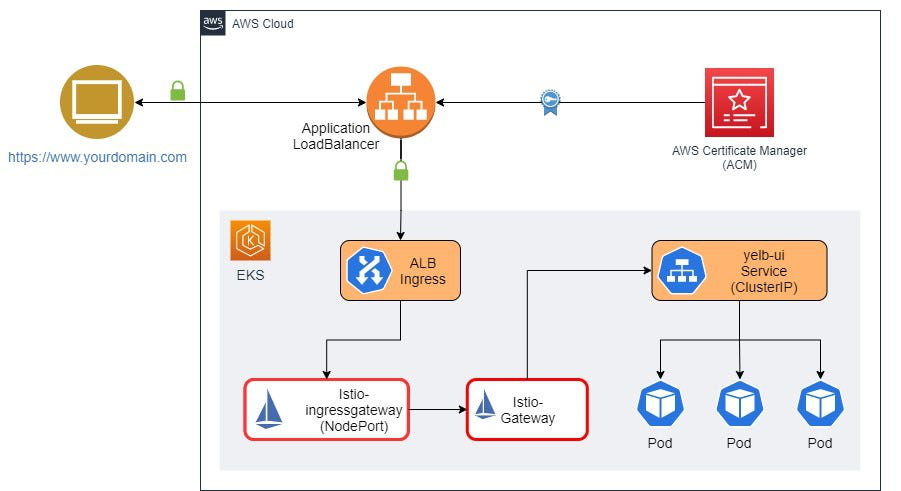
prerequiestes
full eks setup istio to set up eks with alb click here
Install and configure Istio
I am installing Istio using istioctl and changing the service type of istio-ingressgateway to NodePort. The service type of NodePort is required when forwarding traffic from ALB to EC2 instances.
istioctl install \
--set profile=demo \
--set values.gateways.istio-ingressgateway.type=NodePort
Verify Istio installation is properly enabled by using kubectl get po -n istio-system. You should see pods running. Next, attach a label to the default namespace. This will tell Istio to inject a proxy sidecar to pods running in the namespace. You will need to delete existing pods in the default namespace.
#label default namespace
kubectl label ns default istio-injection=enabled --overwrite#delete existing pods so that Istio can inject sidecar
kubectl delete po --all#get list of pods
kubectl get poYou will notice that there are two containers running in each pod.

Generate self-signed TLS certificates
Generate self-signed certificates. We will use a key/pair to encrypt traffic from ALB to Istio Gateway.
openssl req -x509 -newkey rsa:4096 -sha256 -days 3650 -nodes \
  -keyout certs/key.pem -out certs/cert.pem -subj "/CN=kanilebettu.in" \
  -addext "subjectAltName=DNS:kanilebettu"
Generate Kubernetes secret containing key.pem and cert.pem. We will use it with Istio Gateway to implement traffic encryption.
kubectl create -n istio-system secret generic tls-secret \
--from-file=key=certs/key.pem \
--from-file=cert=certs/cert.pem
Configure Istio Gateway and virtual services
I have attached self-signed certificates to Ingress Gateway. Istio will use these certificates to encrypt traffic between ALB and Istio which is a key part to implement end-to-end encryption.
Let us look at Istio Gateway.
apiVersion: networking.istio.io/v1alpha3
kind: Gateway
metadata:
  name: core-gateway
spec:
  selector:
    istio: istio-ingressgateway
  servers:
    - port:
        number: 443
        name: https-443
        protocol: HTTPS
      tls:
        mode: SIMPLE
        credentialName: "tls-secret"
      hosts:
        - "*"
You will notice that I am using the Kubernetes secret named tls-secret as credentialName that we generated earlier. The secret contains openssl generated key/cert. Gateway core-gateway is listening on port 443 for encrypted traffic.
kubectl apply -f istio/gateway.yamlConfigure ALB Ingress resource
apiVersion: networking.k8s.io/v1
kind: Ingress
metadata:
  name: eks-alb-istio-ingress
  namespace: istio-system
  annotations:
    alb.ingress.kubernetes.io/scheme: internet-facing
    #alb.ingress.kubernetes.io/target-type: ip
    alb.ingress.kubernetes.io/healthcheck-path: /healthz/ready
    alb.ingress.kubernetes.io/healthcheck-port: status-port
    alb.ingress.kubernetes.io/healthcheck-interval-seconds: "30"
    alb.ingress.kubernetes.io/healthy-threshold-count: "3"
    alb.ingress.kubernetes.io/unhealthy-threshold-count: "3"
    alb.ingress.kubernetes.io/healthcheck-protocol: HTTP
    alb.ingress.kubernetes.io/backend-protocol: HTTPS
    alb.ingress.kubernetes.io/ssl-policy: ELBSecurityPolicy-FS-1-2-Res-2020-10
    alb.ingress.kubernetes.io/listen-ports: '[{"HTTP": 80}, {"HTTPS":443}]'
    alb.ingress.kubernetes.io/actions.ssl-redirect: |
      {
        "Type": "redirect",
        "RedirectConfig": {
          "Protocol": "HTTPS",
          "Port": "443",
          "StatusCode": "HTTP_301"
        }
      }
    alb.ingress.kubernetes.io/certificate-arn: arn:aws:acm:ap-south-1:948930947331:certificate/b2ab6c06-f3d4-4658-9dee-172b28b86e8e
spec:
  ingressClassName: alb
  rules:
  - http:
      paths:
      - backend:
          service:
            name: ssl-redirect
            port:
              name: use-annotation
        path: /
        pathType: Prefix
      - backend:
          service:
            name: istio-ingressgateway
            port:
              number: 15021
        path: /
        pathType: Prefix
      - backend:
          service:
            name: istio-ingressgateway
            port:
              number: 443
        path: /
pathType: Prefix| Make sure to use your own valid domain and certificate arn. |
kubectl apply -f <ingress_file_name>.yamlOnce Ingress is installed, it will provision AWS Application Load Balancer, bind it with the ACM certificate for HTTPS traffic and forward traffic to Istio resources inside the EKS cluster.